For drummers, students, and teachers
Tune snare drums and toms with a step-by-step guide
Check1.2 listens to taps on a snare, tom, or floor tom and shows whether the pitch is low, near the reference, or high. Follow one tension rod adjustment at a time.
Get Check1.2 free on the App Store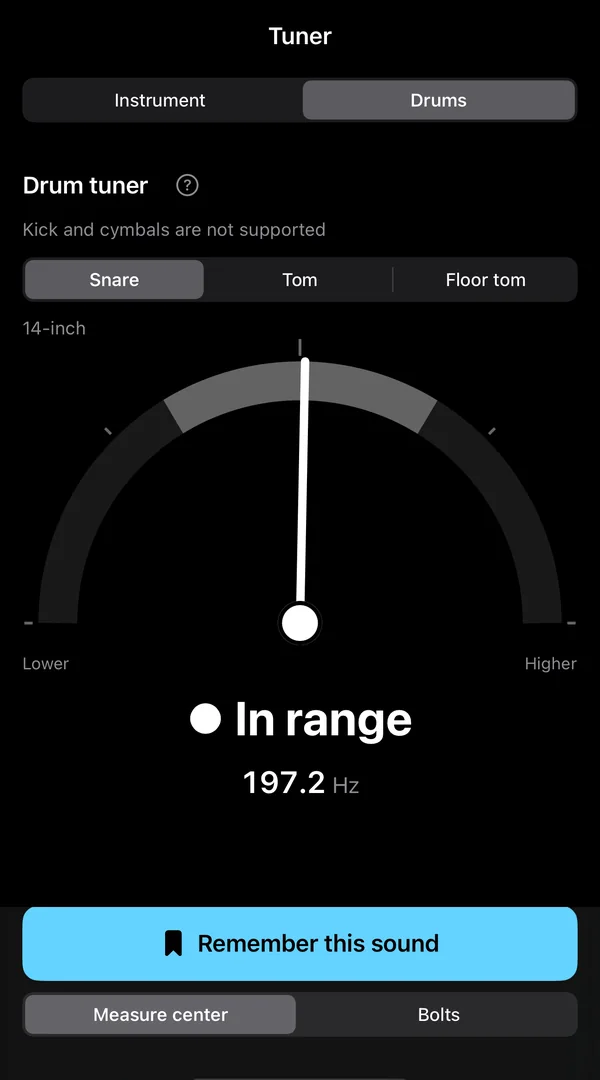
Check a drum's pitch
Open Drum from the tuner screen and tap the center of the drumhead. A semicircular needle and clear label show low, near the reference, or high; frequency in Hz appears in smaller type.
Choose the drum size
Snare uses a 14-inch reference. Choose 10-, 12-, or 13-inch toms and 14- or 16-inch floor toms. If you are unsure, choose “Unknown.”
Match tension rod pitches
Tap near each tension rod. The guide compares readings with their average and marks higher, lower, or matching positions on a top-down drum diagram. It then gives one next step, such as “Tighten rod 6.”
Where and how to tap
- To check pitch, tap the center of the head.
- To match tension rods, tap just inside each rod.

A stick adds its own sound. Knock lightly with a loosely closed hand, as if knocking on a door.
Know what it covers
Kick drums and cymbals are not included. Remove the snare wires before tapping a snare. The guide is available during the 7-day trial and after purchasing the Full version. Check1.2 also includes a regular tuner and metronome.
Free to download. Optional Full version.
No account is required. The Full version is $6.99 as a one-time U.S. App Store purchase (as of October 2026) and includes a 7-day free trial. No automatic charge when the trial ends. Regional prices may differ and can change.
More Check1.2 guides
Try Check1.2 free on your iPhone
Free to download. No account required. Full version is an optional one-time purchase.
Get Check1.2 free on the App Store